Using Kakobuy on a phone is not only a question of finding an app. You may be opening a saved item, reading warehouse photos, following a parcel or returning to an interrupted payment. Identify that task before switching between an app and a browser. Otherwise, a change of screen can make it harder to tell whether you are continuing the same action or starting it again.
Keep the Item ID, order reference or parcel reference appropriate to the task. A familiar image, an app icon or an open tab is not enough to establish which item or transaction you are viewing.
Choose the entry point for your device
Kakobuy's mobile landing page, accessed on September 12, 2026, presents a beginner sequence: create an account, find an item, review a quality check, confirm receipt and ship a parcel. That sequence identifies places to begin; it does not show what an individual account will be allowed to do after signing in.
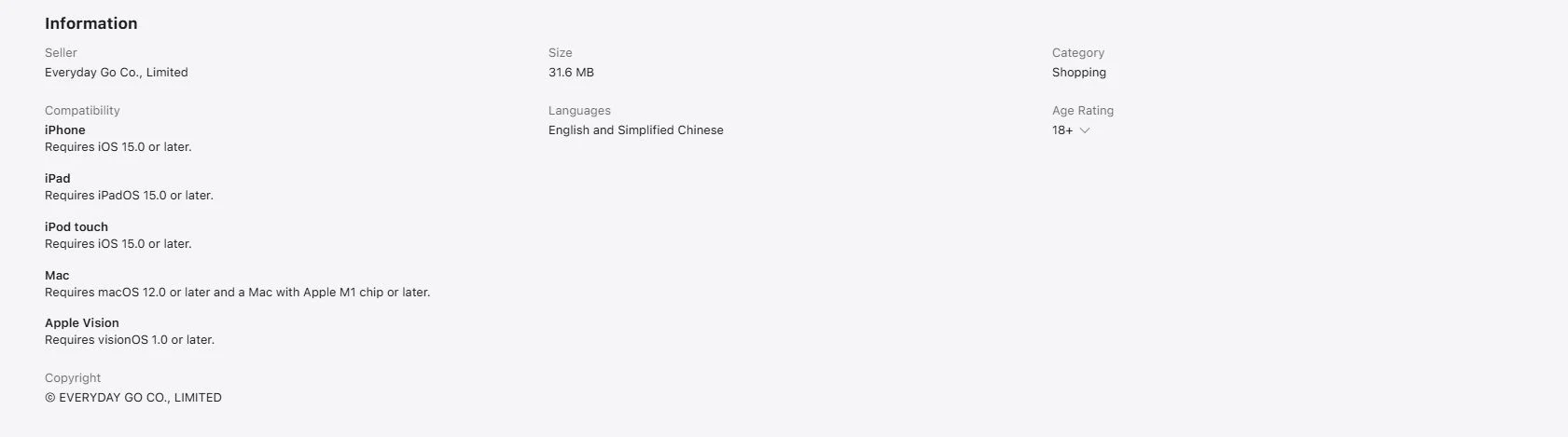
Read the current app-store entry's developer information, device compatibility and language details before deciding whether it suits your device. A requirement shown for one device view and store region is not a universal requirement for every phone or region.
The Apple listing does not establish the identity or suitability of an Android installation file. For a different device, begin with the platform's current navigation and examine the destination. Do not treat a similarly named download or an unsolicited installation link as interchangeable with the entry you intended to use.
The official website's Android entry on September 8, 2026 was a direct APK link, even though its badge resembled a Google Play badge. Keep that distribution path separate from the Apple listing; no installation, package-integrity result or device compatibility follows from the link.
Open the item before acting on it
When returning to a saved find, compare its Item ID and selected option with your notes. A link opening in a different view does not mean it has preserved your size or other selection. Recheck the choice before adding or paying for anything.
Small screens can also hide the relationship between a measurement, its unit and its label. Open the relevant detail rather than inferring a size from a cropped image. The spreadsheet links guide explains which item details should travel with a saved find.
For warehouse photos, view enough detail to identify the model, style and size being discussed. Those are the areas described in the English inspection guidance; they do not establish personal fit or unseen performance. Use the QC photos guide when deciding which remaining question to ask.
If a page stalls, preserve the task first
Note the last action you took, the page you reached and any displayed error. Then distinguish a page that will not load from a page that loads but shows an unwanted account status. Reopening a browser may help investigate the first; it does not explain the second.
If no payment was being submitted, closing and reopening the affected page can be a modest first check. You can also compare another connection or browser to narrow whether the problem is local to that setup. Change one thing at a time so that a different result is meaningful.
Avoid beginning with account deletion, removal of all stored browser data or uninstalling an app. Those actions can remove useful session context, and reinstalling is not an explanation for an order state. If access itself is blocked, continue with account help.
Treat an interrupted payment differently
A blank page, an app closing or a return to the sign-in screen does not tell you whether the payment provider accepted the transaction. Do not immediately repeat the payment in another browser merely because the first screen stopped responding.
Read the provider's record and the relevant Kakobuy balance or order state. Keep the amount, currency, time and transaction reference together. If they disagree, follow the payment-status decision guide or ask support to locate the original transaction before authorising another one.
The same separation helps with tracking. A mobile page refreshing successfully does not create a new carrier event. If the page is readable but the event is unchanged, treat that as a tracking question, not automatically as an app fault.
Ask for help with the actual interruption
Describe whether you used the app or browser, the device and relevant software version, the stage you reached and whether any money action was involved. Do not report every mobile problem as “the app is down.” A clear support request can identify the affected step without claiming a cause you have not established.
Explore a specific question
FAQ
What system version does the Kakobuy app require?
Read the current store entry for your device and region. This page does not set a single system requirement across all app versions and devices.
Should I install another app if a Kakobuy page does not open?
First identify whether the problem is page loading, account access or a transaction state. Switching software without preserving the original task can make the situation less clear.
Can I retry a payment after the app closes?
Check the original provider transaction and Kakobuy state first. An app closing alone does not establish that no charge occurred.